Thank you so much for the time and effort you’ve put into this guide!
Do you happen to know where the 21:9 Wide cover image (under Metadata > Promo images) ends up being used?
I couldn’t see it in use on any of the featured releases on the itch homepage, and the background for those seems to be a blurred version of the project’s first screenshot.
I don't know for certain how it's used. There's nothing directly stated in Itch's documentation about it, and I've never seen anywhere it's clearly put to use.
There are random comments (reddit, the forums, github, etc.) that suggest it is supposed to be used for featuring the game on the homepage (https://github.com/itchio/itch.io/issues/614) and Lemon Cosmos's guide (https://lemoncosmos.itch.io/easy-releasy) says that it's the blurred out background image the video and screenshots are displayed over, but I haven't seen anything confirm that.
If you inspect the background image on the homepage it does indeed look like there is sometimes a separate image used for that background. If it's true that the Wide Cover image you upload is for that blurry background image, I suspect there's some kind of fallback where it'll use the Wide Cover if you upload one, but it'll use one of your screenshots if you don't. Note that it is possible for a game featured on the homepage to not have a background image on the homepage banner; there's a game called dasOS_ that's been featured recently that has no images uploaded to it, and the homepage featured banner for it doesn't include a background image.
I believe if you add a gif to your description field it SHOULD play automatically. As for the screenshots (the images in the right-hand column of the game page,) I'm not seeing those play automatically in the example you linked to when I use Firefox, Chrome, or Edge. For me, the screenshots only play when I click on them and view them at their original size. What browser are you using that is showing them as playing even when you haven't clicked on them.
Looking at the example you shared, it looks like itch may now be using a CDN to dynamically re-scale and compress the screenshots on upload. While this helps with the page load performance, it may be having the unintended side effect of removing the gif animation because it's just taking the first frame of the gif when it cuts the scaled down version.
This IS different behavior from how itch handled screenshots back when I first wrote my guide. Originally, itch just reduced the screenshot's height and width, but still loaded the original image.
It's possible itch only has the CDN step in if the image exceeds a certain size, which would explain why you might see animated gifs showing up as screenshots on some game pages. I'll have to do more digging to confirm that though.
Hey there! "Edit theme" is accessed from viewing your game's page while signed into your account (rather than by editing your game from the Dashboard.)
If you are potentially interested in adding it to a resource website https://verzatiledevorg.github.io/Itchio_HandBook/docs/GettingStarted do let me know, trying to add knowledgable people together in one place and section. :) and your article would be a good fit if of course you would like to.
← Return to tool
Comments
Log in with itch.io to leave a comment.
Thank you so much for the time and effort you’ve put into this guide!
Do you happen to know where the 21:9 Wide cover image (under Metadata > Promo images) ends up being used?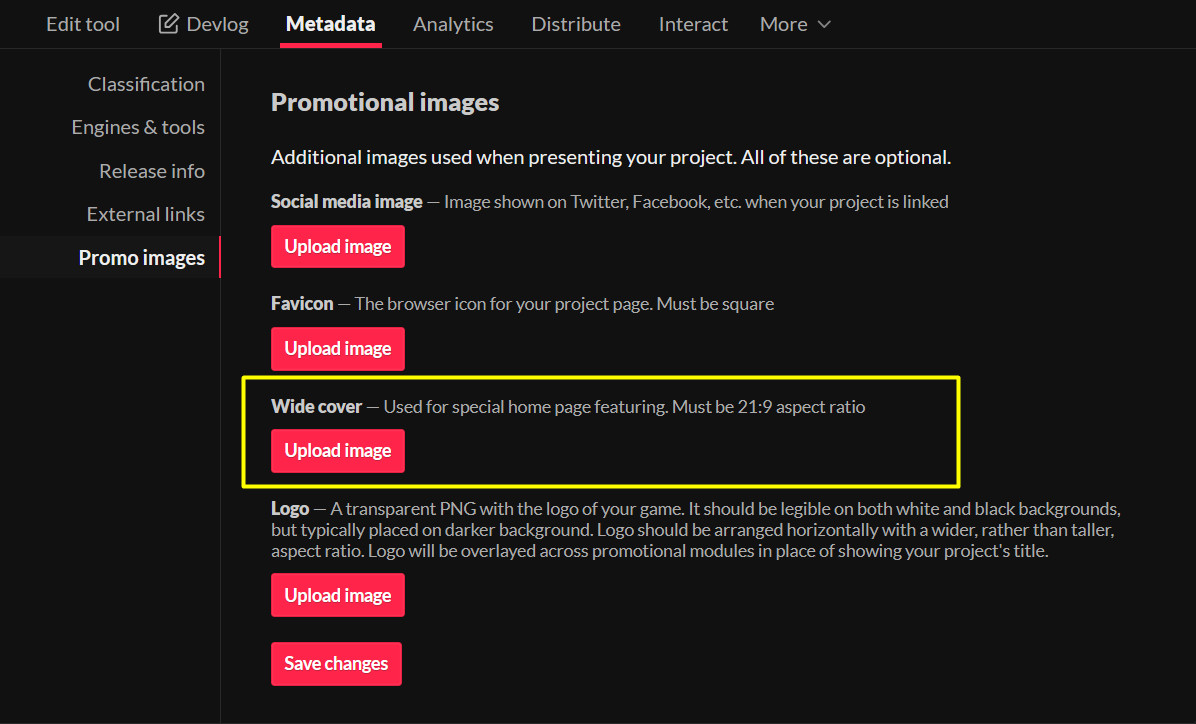
I couldn’t see it in use on any of the featured releases on the itch homepage, and the background for those seems to be a blurred version of the project’s first screenshot.
I don't know for certain how it's used. There's nothing directly stated in Itch's documentation about it, and I've never seen anywhere it's clearly put to use.
There are random comments (reddit, the forums, github, etc.) that suggest it is supposed to be used for featuring the game on the homepage (https://github.com/itchio/itch.io/issues/614) and Lemon Cosmos's guide (https://lemoncosmos.itch.io/easy-releasy) says that it's the blurred out background image the video and screenshots are displayed over, but I haven't seen anything confirm that.
If you inspect the background image on the homepage it does indeed look like there is sometimes a separate image used for that background. If it's true that the Wide Cover image you upload is for that blurry background image, I suspect there's some kind of fallback where it'll use the Wide Cover if you upload one, but it'll use one of your screenshots if you don't. Note that it is possible for a game featured on the homepage to not have a background image on the homepage banner; there's a game called dasOS_ that's been featured recently that has no images uploaded to it, and the homepage featured banner for it doesn't include a background image.
Thanks so much for the info!
Sure thing! Sorry I wasn't able to give you a more definitive answer.
Haha nice!
Really helpful! Thanks!
Thanks!
merci
Awesome. Thanks!
I tend to forget. Thanks!
Some pages seem to include GIF screenshots where the GIF is automatically playing even without opening it (example).
Do you know how that is done?
Hi, you can upload gif files as screenshots or in the description panel, they will play out !
I believe if you add a gif to your description field it SHOULD play automatically. As for the screenshots (the images in the right-hand column of the game page,) I'm not seeing those play automatically in the example you linked to when I use Firefox, Chrome, or Edge. For me, the screenshots only play when I click on them and view them at their original size. What browser are you using that is showing them as playing even when you haven't clicked on them.
Based on this forum post from a couple months ago (https://itch.io/t/5369196/gifs-suddenly-not-animating?after=40#post-15034429) it's likely there was a change in how the Screenshots are handled.
Looking at the example you shared, it looks like itch may now be using a CDN to dynamically re-scale and compress the screenshots on upload. While this helps with the page load performance, it may be having the unintended side effect of removing the gif animation because it's just taking the first frame of the gif when it cuts the scaled down version.
For example, the first screenshot (the one with the stairs) is using this version of the image when viewing the game page, and despite having the filename ending in .gif it's actually detected as being a PNG: https://img.itch.zone/aW1hZ2UvNzk2Njc3LzQ3MzYzNTYuZ2lm/347x500/JG2P1K.gif
But it's using a different file flagged as "original" when you click on it: https://img.itch.zone/aW1hZ2UvNzk2Njc3LzQ3MzYzNTYuZ2lm/original/Bx6UEF.gif
This IS different behavior from how itch handled screenshots back when I first wrote my guide. Originally, itch just reduced the screenshot's height and width, but still loaded the original image.
It's possible itch only has the CDN step in if the image exceeds a certain size, which would explain why you might see animated gifs showing up as screenshots on some game pages. I'll have to do more digging to confirm that though.
how do I replace the left side cover img which automatically show up? I can't find the option that can edit it.
and that cover is not belong to my game.
Hey. Sorry for the delay in getting back to you on this. What page is that screenshot from? Is it a ranking page for a game jam?
This is the cover I'm currently seeing for your game when viewing it ion your creator page:
How do I use "edit theme"? It doesn't appear on mine.
Hey there! "Edit theme" is accessed from viewing your game's page while signed into your account (rather than by editing your game from the Dashboard.)
Oh, I see. Thank you very much!
The limits for the background image on itch.io are 3840x2160px
If you are potentially interested in adding it to a resource website https://verzatiledevorg.github.io/Itchio_HandBook/docs/GettingStarted do let me know, trying to add knowledgable people together in one place and section. :) and your article would be a good fit if of course you would like to.